

Is Someone Listening to Your Calls? A Guide for Mobile Users
Your mobile phone is your life. You use it for work. You use it for family. You use it for private chats. But what if your calls are going to someone else? This is not a movie plot. It is a real problem. Many people have their calls forwarded without knowing it. This can lead to stolen data. It can lead to missed messages. It can even lead to bank fraud. Every person in India needs to know how to check call forwarding in VI/JIO/AIRTEL/BSNL to stay safe.
Security experts are worried. They see a rise in call scams. Hackers often use call forwarding to steal one-time passwords. These are the OTPs you get for banking. If a hacker forwards your calls, they get your voice OTPs. They can then enter your accounts. This is why you must act fast. You need to check your settings today. Do not wait for a problem to happen. Be active about your safety.
The Hidden Danger of Call Forwarding
Call forwarding is a helpful tool. It was made for busy people. It lets you send calls to another number when you are busy. It helps when your battery is dead. It is great for office work. But it is also a tool for thieves. A thief can take your phone for a minute. They can type a short code. Suddenly, all your calls go to them. You will not even know it is happening. Your phone will not ring. The thief gets everything. This is a big threat to your privacy.
Sometimes, the settings change by mistake. You might press buttons in your pocket. An app might change the settings. Or maybe an old setting was never turned off. No matter the reason, you must know the truth. You need to learn how to check call forwarding in VI/JIO/AIRTEL/BSNL to stay safe. Every carrier uses different codes. These are called USSD codes. They are quick and free to use. You do not need the internet for them. You only need a signal.
How to Check Call Forwarding in VI: A Step-by-Step Guide
Vi users need to be careful. Vi has millions of users across India. If you use the Vi network, checking your status is easy. You do not need to call customer care. You do not need to wait on hold. You can do it yourself in seconds.
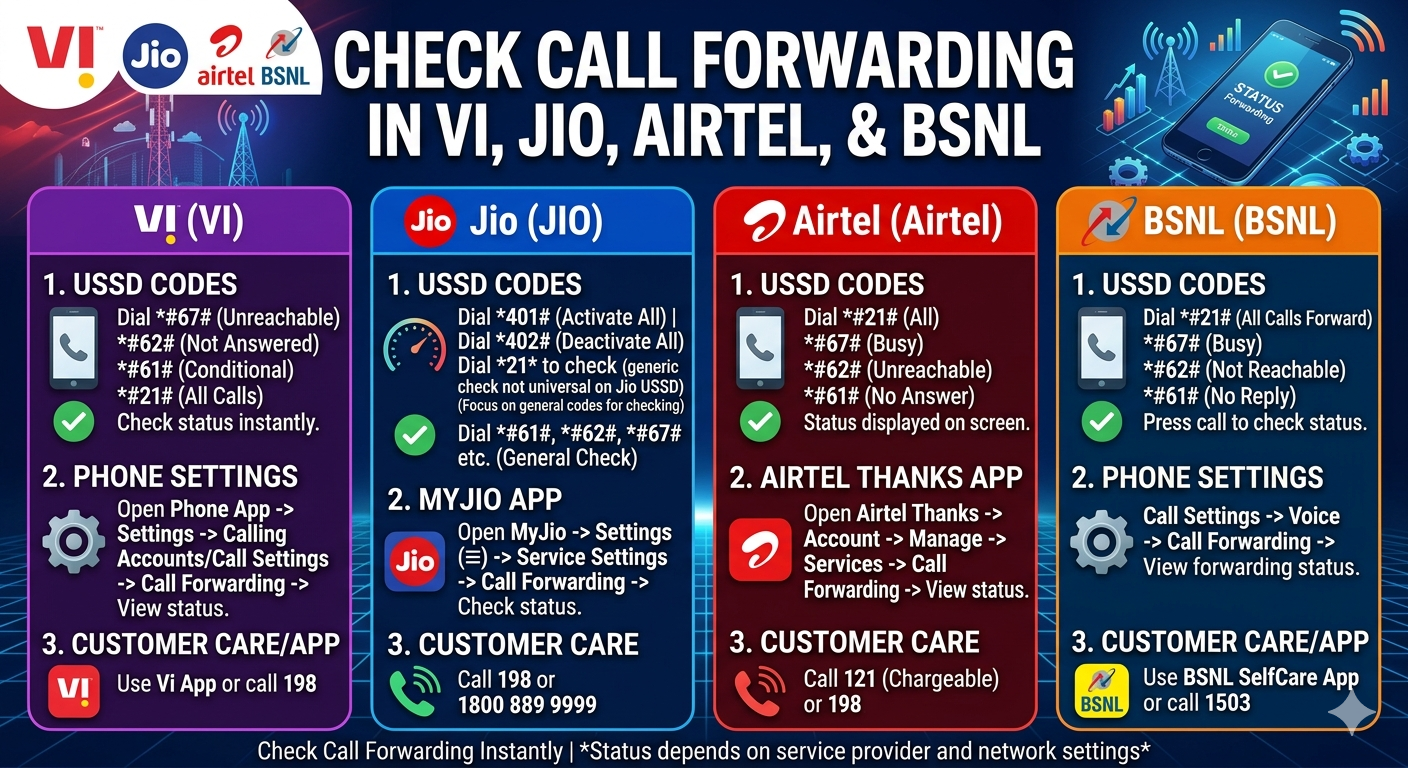
To check your status on Vi, open your phone dialer. Type *#67# and press the call button. This code tells you if calls go elsewhere when you are busy. Another important code is *#61#. This shows where calls go if you do not answer. If you see a number you do not know, be alert. That means a stranger is getting your calls. You must stop this right now. Vi also uses *#62# to check forwarding when your phone is off. Finally, *#21# checks for “All Calls” forwarding. This is the most dangerous one. It sends every single call to another person.
If you find an unknown number, do not panic. You can cancel it. Dial ##002# to erase all forwarding settings. This resets your line to normal. It is a good habit to do this once a month. It keeps your line clean. It ensures your privacy is safe.
Protecting Your Jio Connection
Jio changed how we use data. It is a huge network. But even Jio users are at risk. Knowing how to check call forwarding in VI/JIO/AIRTEL/BSNL is just as important for Jio fans. Jio works a bit differently. It is a 4G and 5G only network. This means the codes are very reliable.
For Jio, the main code is *#21#. Dial this and wait for the message. The message will list several things. It will show Voice, Data, and SMS. Each one should say “Not Forwarded.” If any of them show a phone number, you have a problem. That number is stealing your info. You can also use the MyJio app. Open the app and go to settings. Look for “Call Settings.” Here, you can see if forwarding is active. The app is very simple. It is easy for anyone to use. Even if you are not good with tech, the app makes it clear.
Jio also has codes for specific times. Use *#61# to check “No Answer” forwarding. Use *#62# for “Unreachable” forwarding. Use *#67# for “Busy” forwarding. If you see something wrong, dial *402. This is the Jio master code to stop all forwarding. It is a simple way to stay safe.
Airtel Users: Stay Alert and Stay Safe
Airtel is one of the oldest companies in the market. Many people use Airtel for business. This makes their calls very valuable. If you use Airtel, you must check your settings now. Learning how to check call forwarding in VI/JIO/AIRTEL/BSNL is a top priority for work users. You do not want your business secrets going to a rival.
Airtel uses the standard codes. Open your phone app. Type *#21# and hit call. This is the main check for Airtel. It will tell you the status of your voice calls. If it says “Disabled” or “Not Forwarded,” you are okay. If it shows a 10-digit number, someone else is listening. You should also check *#62#. This is for when your phone is out of reach. Many hackers use this. They wait for you to go into a basement or a flight. Then, they take your calls. It is a smart trick.
To fix an Airtel line, dial ##21#. This clears the settings. You can also go to your phone settings. Go to the “Call” section. Find “Call Forwarding.” This will show you four options. Make sure all of them are “Off.” Airtel is very stable, but it is better to be safe. Checking once a week is a smart move.
BSNL: Old Network, New Risks
BSNL is the heart of rural India. Many older people use BSNL. These users are often the targets of scams. They may not know about call forwarding. This is why children and grandkids must help. They must teach their elders how to check call forwarding in VI/JIO/AIRTEL/BSNL. It is a simple way to protect the family.
On BSNL, the codes are mostly the same. Dial *#21# to see the main status. BSNL often shows a “Network Service” message. Read it carefully. If you see “Forwarded to” followed by a number, act now. Use *#67# to check the busy status. Use *#61# for the no-answer status. BSNL users can also use the code ##002# to clear everything. This is a “global” clear code. It works on almost every BSNL SIM card in the country.
Remember, BSNL signals can sometimes be weak in far areas. If the code fails, try again. Move to a window or go outside. The code needs a clear connection to the tower. Once the code works, it gives you peace of mind. You will know that your calls stay on your phone.
Why Checking Your Phone Settings is Important
Why do we talk about this so much? Because the world is digital now. Your phone number is your identity. It is linked to your Aadhaar card. It is linked to your bank. It is linked to your social media. If someone controls your calls, they control your life. This is not a small issue. It is a major safety gap that many people ignore.
Criminals use “Social Engineering.” They call you and pretend to be from the bank. They ask you to dial a code like *21* followed by their number. They tell you it is for a “Network Update.” Do not do it! That code turns on call forwarding. They are tricking you into giving them your calls. This is a very common scam in India right now. That is why you must know how to check call forwarding in VI/JIO/AIRTEL/BSNL. If you know the codes, you can see if you were tricked.
Knowledge is your best weapon. When you know how to check your status, you cannot be fooled. You are in charge of your own phone. You are in charge of your own data. This is true for every person, from the city to the village. We must all be smart users.
Manual Methods: Using Phone Settings
Sometimes codes do not work. Maybe your phone is too new. Maybe your software is different. You can still check your status. You can use the settings menu inside your phone. This works for Android and iPhone. It is a bit slower than a code, but it gives good detail.
On an Android phone, follow these steps:
- Open the Phone app (where you dial numbers).
- Look for three dots or the word “More” in the corner.
- Tap on “Settings.”
- Look for “Calling Accounts” or “More Services.”
- Tap on your SIM card (Airtel, Jio, etc.).
- Tap on “Call Forwarding.”
- Wait for the phone to load the settings.
On an iPhone, the steps are different:
- Open the main “Settings” app.
- Scroll down and tap on “Phone.”
- Tap on “Call Forwarding.”
- Wait for the switch to appear.
- If it is on, you will see the number where calls are going.
This manual way is great. It shows you the truth. If you see a number there that you did not put, delete it right away. Turn the switch to “Off.” This is another way to check call forwarding in VI/JIO/AIRTEL/BSNL without using codes.
Common Signs of Call Forwarding
How do you know if you are being targeted? There are warning signs. You should watch for these. They tell you that something is wrong with your line. If you see these signs, check your settings right away.
- Your phone does not ring, but you get missed call alerts.
- Your battery dies very fast for no reason.
- You hear strange clicking sounds during a call.
- Friends say your line is always busy when you are not on the phone.
- You get text messages about calls you never made.
These are red flags. Do not ignore them. Your phone might be forwarding data in the background. Most people think it is just a “bad signal.” Usually, it is a setting issue. By knowing how to check call forwarding in VI/JIO/AIRTEL/BSNL, you can find the answer in one minute. It saves you from worry.
Conclusion: Stay One Step Ahead
The digital world moves fast. Scammers move faster. But you can be the smartest person in the room. All you need are a few simple codes. Whether you use Airtel, Jio, Vi, or BSNL, the power is in your hands. You now know the codes. You know the menu settings. You know the warning signs. This knowledge keeps you safe. It keeps your money safe. It keeps your family safe.
Make it a habit to check your phone. Do it on the first day of every month. Teach your friends how to do it. Share this info with your parents. Many people are afraid of technology. But when you explain it simply, they feel strong. Knowing how to check call forwarding in VI/JIO/AIRTEL/BSNL is not just a tech tip. It is a basic rule for living today. Stay alert, stay safe, and keep your private calls private.
Frequently Asked Questions
Is it free to check call forwarding using codes?
Yes, checking your status using codes like *#21# is completely free. You do not need a balance or a data pack. It works on any phone.
Can hackers turn on call forwarding from far away?
It is very hard for a hacker to do this without your help. Usually, they need to touch your phone or trick you into dialing a code. Always be careful about who touches your phone and what codes you dial.
What does “Conditional Forwarding” mean?
This only happens under certain rules. For example, it only sends calls if you are busy, if you don’t answer, or if your phone is off. This is different from “Unconditional” forwarding, which sends every call away right away.
Will resetting my phone stop call forwarding?
A full reset might not stop it. Call forwarding is often a network setting, not just a phone setting. The best way to stop it is to use the codes like ##002# or talk to your carrier.
Does call forwarding affect my WhatsApp calls?
No, these settings only affect regular phone calls. WhatsApp calls use the internet and follow different rules. However, if someone has your SMS forwarded, they could try to log into your WhatsApp account.
What should I do if I find a strange number in my settings?
If you find a number you do not know, stop it right away using the codes. Then, call your bank and change your passwords. It is possible someone was trying to steal your security codes.

