

Meta AI Is Now in India: Your Simple Guide to the New Smart Assistant on WhatsApp
A big change just arrived on your phone. If you live in India, your favorite chat app looks a little different today. WhatsApp has now released Meta AI for millions of users across the country. You may have seen a small, colorful circle at the top of your chat list. That circle is your door to a new world of information. This is not just a small update. it is a big shift in how we use our phones every day.
India is the biggest market for WhatsApp in the world. More than 500 million people here use the app to talk to family and friends. Now, Meta is bringing its most powerful smart technology directly to these users. You do not need to download a new app. You do not need to pay any money. You only need to know how to use Meta AI on WhatsApp in India to get started.
This new tool uses a system called Llama 3. That is the most powerful smart system Meta has ever made. It can answer your questions. It can write stories for you. It can even make pictures from nothing. It feels like chatting with a very smart friend who knows everything. You might be a student or a worker. You might be someone who loves to cook at home. This tool has something for everyone. In this guide, we will explain everything you need to know about this new feature.
What is Meta AI and Why Should You Care?
Meta AI is a smart assistant. It lives inside the apps you already use every day. These include WhatsApp, Instagram, and Messenger. In India, WhatsApp is the main way people talk to each other. Adding AI to this app means that high-tech tools are now in the hands of everyone. You do not need a costly computer to use AI anymore. You only need your phone.
The timing for this is very good. India is moving fast into a digital future. People want ways to get more done. They want answers fast. They want to create things without being experts. Meta AI helps with all of these things. It can speak English well. It is also learning how people talk in India. It understands how life works here. This makes it a very useful tool for your daily life.
Many people have heard of tools like ChatGPT or Google Gemini. Meta AI is like them, but it lives inside WhatsApp. This is its best feature. You are already using WhatsApp all day. You do not have to switch between different apps to search for a fact. You do not have to leave your chat to get help with a message. It is right there where you are already talking to people. This is why everyone wants to know how to use Meta AI on WhatsApp in India right now.
The First Steps: How to Find the Meta AI Button
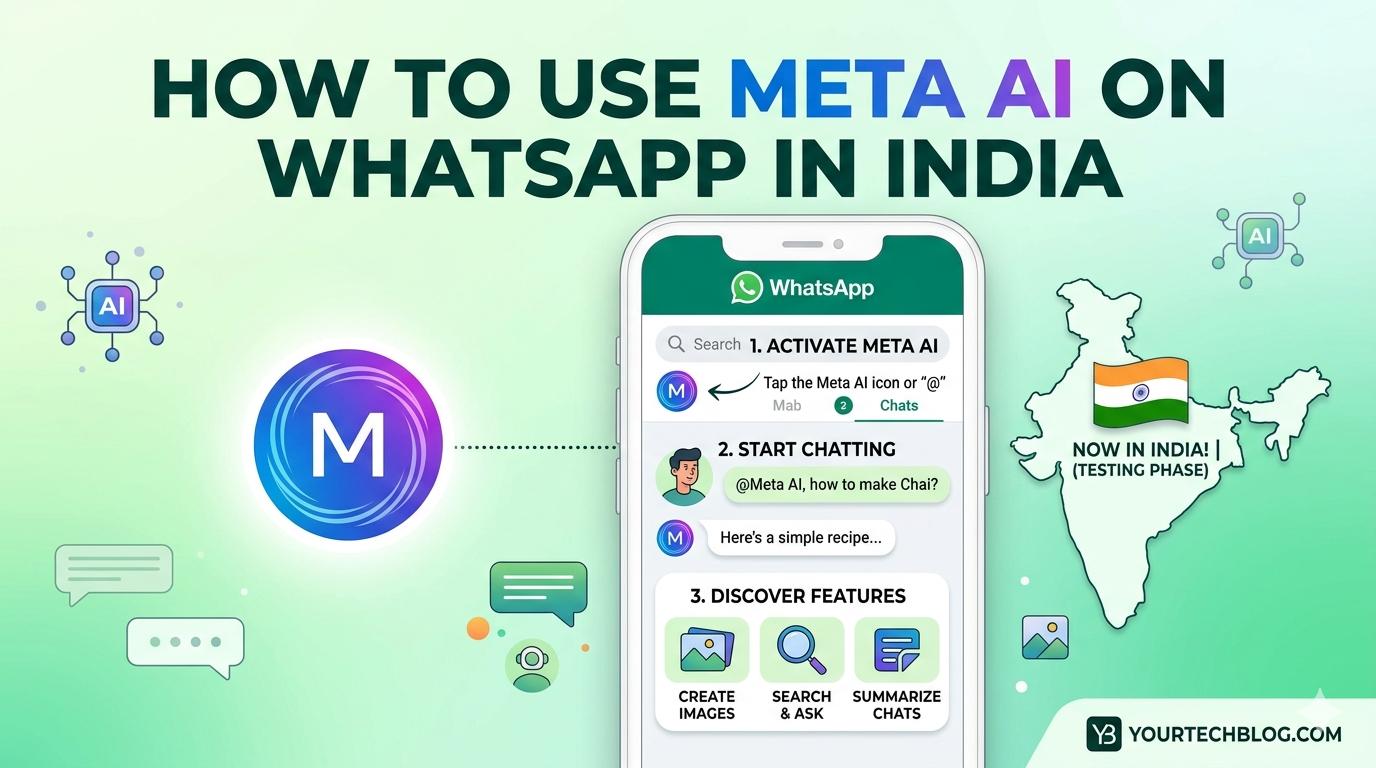
The first thing you need to do is look for the icon. It is a circle with many colors like blue, purple, and green. If you use an Android phone, you will usually find it at the top of your chat list. It sits right next to the search bar. If you use an iPhone, it might be near the top too. Sometimes it shows up as a small icon when you start a new chat.
If you do not see the circle yet, do not worry. Meta is giving this to people in groups. This means some people get it a bit earlier than others. To make sure you are ready, go to the Google Play Store or the Apple App Store. Search for WhatsApp. If you see a button that says Update, tap it. You must have the newest version of the app to see the new features. Once your app is updated, the colorful circle should appear soon.
Once you see the circle, the rest is very easy. Tap on it once. A new chat window will open up. It looks just like a normal chat with a friend. You will see a message that welcomes you. It tells you that you can ask questions or make images. From here, you are ready to start. Learning how to use Meta AI on WhatsApp in India begins with this simple tap.
How to Start a Conversation with Meta AI
Talking to Meta AI is just like texting a friend. You type your message in the chat box. Then you hit the send button. The AI reads your message. It replies almost right away. There is no right or wrong way to talk to it. You can use long sentences. You can also use just a few words. It is very good at knowing what you want.
For example, you can ask for help with a daily task. You can type, “Tell me a recipe for paneer butter masala.” Within seconds, the AI will give you a list of things you need. It will also give you step-by-step steps to cook it. You can even ask it to make the recipe healthy. You can ask it to make the recipe faster too. It remembers what you said before in that same chat. This makes the talk feel very natural.
You can also use it for school or learning. Students can ask, “Explain how gravity works in simple words.” The AI will give an answer that is easy to read. If you still do not understand, you can ask it to explain it to a five-year-old. It will change its words to be even simpler. This is a great way for people across India to get help with their studies or hobbies.
Using Meta AI in Your Group Chats
One of the best features is that you can bring the AI into your groups. This is very helpful when you are planning something with friends. You do not have to leave the group chat to find info. You can call the AI directly into the talk. This is a key part of using Meta AI on WhatsApp in India in the best way.
To do this, type the @ symbol in the message box of your group chat. A list will pop up on the screen. Pick Meta AI from the list. Then, type your question. For example, you can type, “@Meta AI what are the best movies playing in Delhi this weekend?” Everyone in the group will see the question. They will also see the AI’s answer. This helps everyone stay on the same page.
It is important to know that the AI only reads the messages where you tag it. It does not listen to your private talks with your friends. Your privacy is still safe. This feature is great for ending arguments. If your friends are arguing about who won a cricket match, just ask the AI. It will give you the facts. It will end the argument in a few seconds.
How to Create Images with Meta AI
Meta AI can do more than just talk. It can also make pictures. It uses a tool called Imagine. This is a system that turns words into images. You describe what you want to see. Then the AI draws it for you. This is one of the most popular reasons people use Meta AI on WhatsApp in India.
To make an image, start your message with the word “Imagine.” For example, you can type, “Imagine a future version of Mumbai with flying cars.” In a few seconds, the AI will send you a high-quality picture. You can be as detailed as you like. You can ask for a cat wearing a hat. You can ask for a beautiful sunset over the Taj Mahal. You can make almost anything you can think of.
If the picture is not exactly what you wanted, you can ask for changes. You can say, “Make it more colorful.” You can say, “Add more trees.” The AI will change the image based on what you say. This is a fun tool for making cards or posts for social media. It brings a new level of fun to your WhatsApp chats.
Using Meta AI for Work and Getting Things Done
Many people in India use WhatsApp for business. Meta AI can be a great helper for your work life. It can help you write professional emails. It can help you write messages to customers. If you are not sure how to ask your boss for a day off, ask the AI. It can give you a polite draft. You can then copy and paste it.
It can also help with making long text shorter. If you have a long report, you can paste it into the chat. Ask the AI to summarize it. It will give you the main points in a short list. This saves you a lot of time. You can also use it to think of new ideas. If you are starting a new shop, ask the AI for name ideas. It will give you a list of creative options very fast.
For those who find English hard, Meta AI is a big help. You can write your thoughts in simple English. You can ask it to fix your grammar. It helps you sound more professional. This is a big change for many people across the country. It helps people talk better in the world of business. Knowing how to use Meta AI on WhatsApp in India can help you grow your career.
Privacy and Safety: What You Need to Know
When a new tool comes out, people worry about privacy. This is very important. WhatsApp uses a system that locks your messages. This means only you and the person you are talking to can read them. Meta says that your personal messages with friends remain private. The AI cannot see them. It only sees them if you tag it in a group.
However, your chats with the AI itself are used to make the system better. This is how all AI tools work. You should not share very personal info. Do not tell the AI your passwords. Do not share your bank details. It is a smart tool, but you should still be careful. Meta has safety rules built in. This means the AI will not make bad or mean content. It is designed to be a safe helper for everyone.
If you ever feel uneasy, you can delete your chat with Meta AI. This works just like deleting any other chat on WhatsApp. You can also stop using it at any time. Meta gives you control over how you use the AI. Understanding these safety steps is part of using Meta AI on WhatsApp in India in a safe way.
Common Problems and How to Fix Them
Sometimes tech does not work perfectly. You might have some issues when you try the new features. The most common problem is not seeing the Meta AI button. As we said before, the best fix is to update your app. If it is still not there, it might be because Meta is releasing it slowly. Just wait a few days. It should show up soon.
Another issue might be the AI not knowing what you want. If the AI gives a strange answer, try to use different words. Be more specific. Instead of saying “Tell me about India,” try “Tell me about the history of the Indian flag.” The more details you give, the better the AI can help. It is also important to remember that the AI can make mistakes. It can sometimes say things that are not true. Always check important facts if you need them for school or work.
If the image tool is not working, make sure you use the word “Imagine” at the start. Also, check your internet. Making images uses more data than sending a text. If your signal is weak, the image might not load. Moving to a spot with better Wi-Fi or mobile data usually fixes this problem.
The Future of AI in India
The launch of Meta AI on WhatsApp is just the start. India is at the center of the AI world right now. We will likely see more features soon. Meta is working on making the AI know more Indian languages. This includes Hindi, Bengali, and Marathi. This will make the tool even more useful for people who do not speak English.
Imagine speaking to the AI in your own language and getting a fast answer. This will help people in small towns get the same info as people in big cities. School, health, and business will all change because of these tools. Learning how to use Meta AI on WhatsApp in India today helps you get ready for the future.
As the AI gets smarter, it will do harder tasks. It might help you book train tickets. It might help you pay bills inside the chat. The goal is to make your phone a real personal assistant. WhatsApp is no longer just for chatting. It is becoming an app that can handle almost anything you need in your daily life.
Frequently Asked Questions
Is Meta AI on WhatsApp free to use in India?
Yes, Meta AI is currently free for everyone on WhatsApp in India. You do not need to pay any fees to use the chat or image features. All you need is internet and the newest version of the app.
Do I need to download a different app to use Meta AI?
No, you do not need a new app. Meta AI is built right into WhatsApp. Just look for the colorful circle on your main chat screen. If you don’t see it, update your app from the store.
Can Meta AI read my private messages with my family?
No, Meta AI cannot read your personal, locked messages. It only sees the messages you send to it in the AI chat. In group chats, it only sees messages where you tag it with the @ symbol.
How do I make the AI create a picture for me?
To make a picture, open the Meta AI chat. Type the word “Imagine” and then describe what you want. For example, type “Imagine a blue elephant.” The AI will then make the picture for you.
What languages does Meta AI work with in India?
Right now, Meta AI works best in English. But Meta is working to add many Indian languages. You can try typing in Hindi. It might know simple words. Full support for local languages will get better over time.
What should I do if the Meta AI button is not there?
First, update WhatsApp to the latest version. If the button is still not there, it means your account does not have it yet. Meta is giving it to millions of people slowly. Check again in a few days.
Conclusion: Start Using the New Way to Chat
Meta AI is a powerful new tool. It is changing how we use our phones. By putting AI in WhatsApp, Meta has made new tech simple for everyone. You might want to learn something new. You might want to make a cool image. You might need help with your work. The AI is there to help you. It is fast, easy to use, and free. This guide has shown you how to use Meta AI on WhatsApp in India so you can stay ahead.
The best way to learn is to try it. Open your WhatsApp today. Look for that colorful circle. Send it a hello. Ask it a question you have always had. Try to make a funny picture. The more you use it, the more you will see how it helps. This is a new time for chatting in India. We have a world of knowledge right in our hands. Do not be afraid to see what this smart assistant can do for you. Happy chatting!

